Buzzer
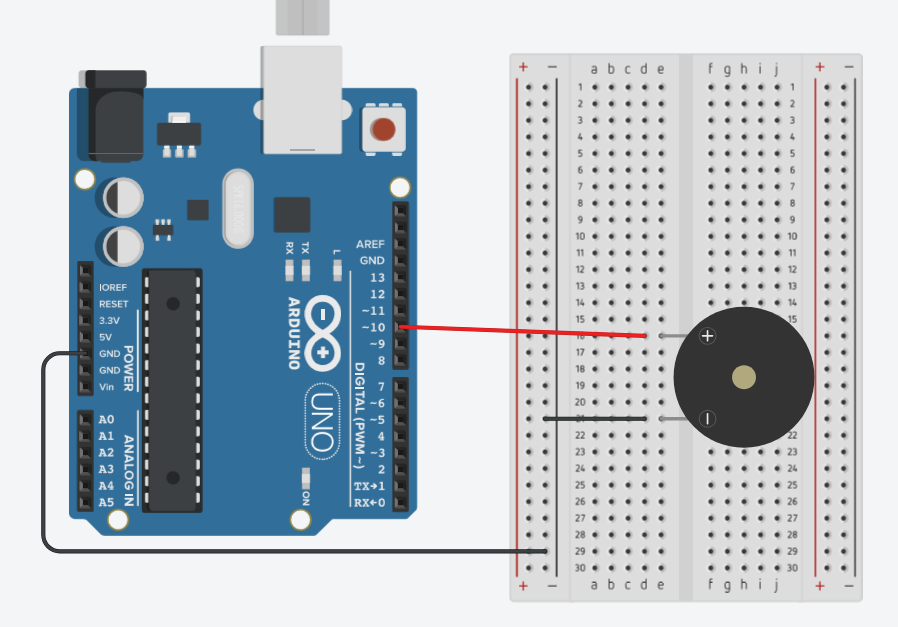
Skeem:
Komponendid:
- Arduino Uno
- Arendusplaat
- Piezo Element
Töö protsess:
See Piezo Element mängib sumistil etteantud meloodiat. Käib järjest läbi meloodia andmed (noodid/pausid ja nende rütmid) ning mängib iga osa sumistil õige heliga ja õige kestusega.
DHT11 ja DHT22
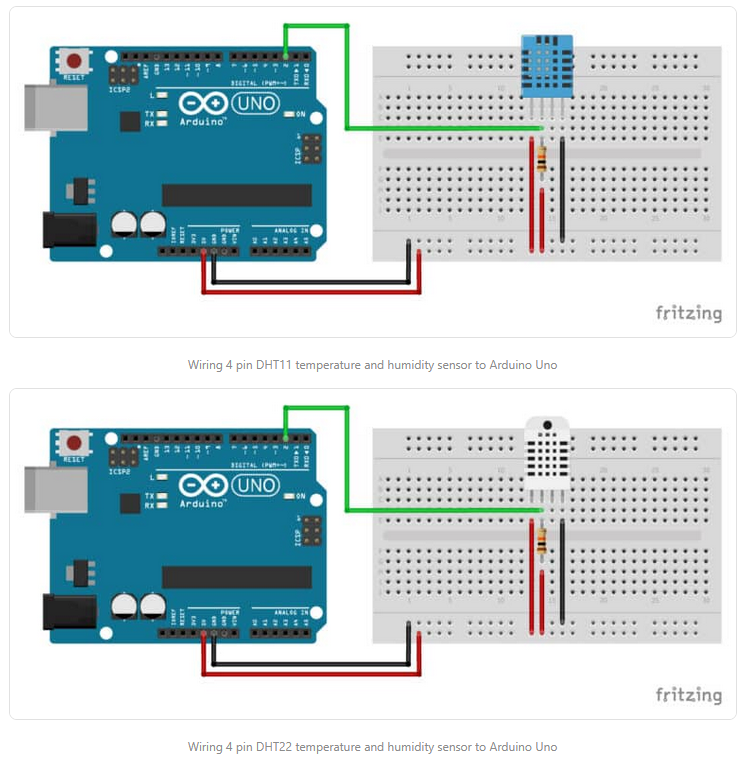
Skeem:
Komponendid:
- Arduino Uno
- Arendusplaat
- DHT11
- DHT22
- 2 x 10 kΩ takisti
Töö protsess:
Mõlemad, DHT11 ja DHT22, on populaarsed digitaalsed temperatuuri- ja niiskusandurid, mida kasutatakse sageli koos mikrokontrolleritega nagu Arduino. Nad mõõdavad ümbritseva õhu temperatuuri ja suhtelist niiskust.
Ülesanne
Töö kirjeldus:
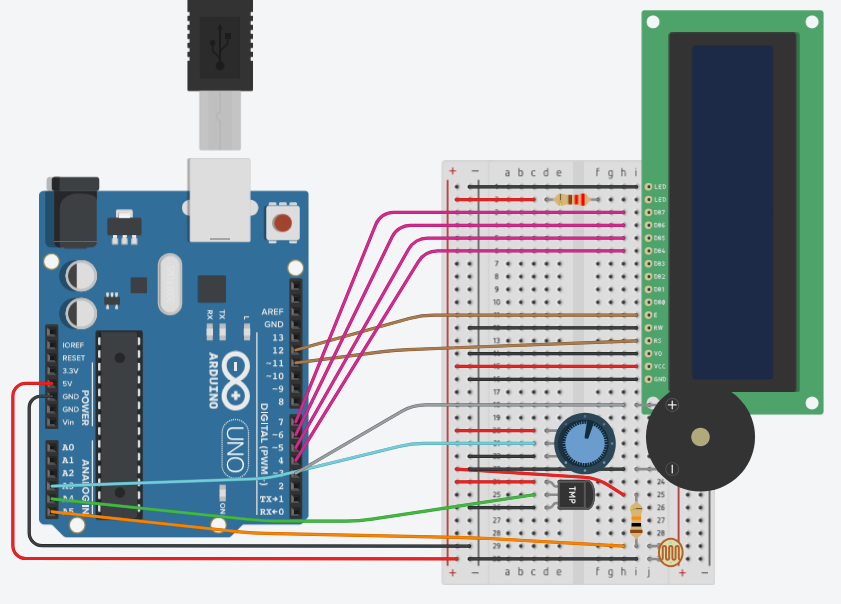
See on minialarm, mis mõõdab temperatuuri (TMP36) ja valgust (LDR). Andmeid näitab LCD-ekraanil. Süsteemi saab potentsiomeetriga sisse/välja lülitada.
Kasutatud komponendid:
- Arduino Uno
- Arendusplaat
- TMP36
- Potentsiomeeter
- 10 kΩ takisti
- 220 Ω takisti
- Piezo
- Fotoresistor
- LCD Ekraan
Töö protsess:
Alguses LCD-ekraan kontrollitakse potentsiomeetri abil, kas süsteem on sisse lülitatud. Loetakse temperatuuri- ja valgusandurite näidud. Seejärel, sõltuvalt tuvastatud tingimustest – kas on pime, liiga kuum või normaalne olukord – uuendatakse LCD-ekraani kuvatavat infot ja juhitakse vastavalt kas taustamuusika või häiresignaali summerit. Tsükli lõpus tehakse lühike paus enne uuesti alustamist.
Skeem:
Kood:
#include <LiquidCrystal.h>

const int potPin        = A3;
const int tempPin       = A4;
const int ldrPin        = A5;
const int lcdRs         = 11;
const int lcdEn         = 12;
const int lcdD4         = 4;
const int lcdD5         = 5;
const int lcdD6         = 6;
const int lcdD7         = 7;
const int musicPin      = 3;
const int alarmPin      = 3;

const int   switchThreshold = 512;   // pot > mid → system ON
const float tempThreshold   = 23.0;  // °C
const int   lightThreshold  = 200;   // ADC units

const int songLength = 18;
char notes[songLength + 1] = "cdfda ag cdfdg gf ";
int beats[songLength] = {
  1,1,1,1,1,1,4,4,2,1,1,1,1,1,1,4,4,2
};
int tempo = 150;  // madalam → kiirem

LiquidCrystal lcd(lcdRs, lcdEn, lcdD4, lcdD5, lcdD6, lcdD7);

void setup() {
  Serial.begin(9600);
  lcd.begin(16, 2);
  pinMode(musicPin, OUTPUT);
  pinMode(alarmPin, OUTPUT);
}

void loop() {
  // Lüliti/potentsiomeetri lugemine
  int controlVal = analogRead(potPin);
  bool systemOn = controlVal > switchThreshold;

  if (!systemOn) {
    // Süsteem OFF
    noTone(musicPin);
    noTone(alarmPin);
    lcd.clear();
    delay(500);
    return;
  }

  // TMP36 teisendus: V = raw*(5.0/1023); Temp = (V - 0.5)*100
  int   rawTemp = analogRead(tempPin);
  float voltage = rawTemp * (5.0 / 1023.0);
  float tempC   = (voltage - 0.5) * 100.0;

  // Fototakisti lugemine
  int lightVal = analogRead(ldrPin);

  Serial.print(tempC, 1);
  Serial.print(", ");
  Serial.println(lightVal);

  if (lightVal < lightThreshold) {
    lcd.clear();
    lcd.setCursor(0, 0);
    lcd.print("Tuvastatud       ");
    lcd.setCursor(0, 1);
    lcd.print("pimedus          ");
  }
  else if (tempC > tempThreshold) {
    lcd.clear();
    lcd.setCursor(0, 0);
    lcd.print("Temp liiga       ");
    lcd.setCursor(0, 1);
    lcd.print("korge!           ");
  }
  else {
    lcd.clear();
    lcd.setCursor(0, 0);
    lcd.print("Temp: ");
    lcd.print(tempC, 1);
    lcd.print((char)223);
    lcd.print("C");
    lcd.setCursor(0, 1);
    lcd.print("Light: ");
    lcd.print(lightVal);
  }

  // Alarmitingimus
  if (tempC > tempThreshold || lightVal > lightThreshold) {
    noTone(musicPin);
    tone(alarmPin, 1000); // alarm heli
  } else {
    noTone(alarmPin);
    tone(musicPin, 440);  // taustatoon
  }

  if (lightVal < lightThreshold) {
    noTone(musicPin);
    noTone(alarmPin);
  } else if (tempC > tempThreshold) {
    noTone(musicPin);
    playAlarmMelody();
  } else {
    noTone(alarmPin);
    playMelody();
  }
  delay(500);
}

void playMelody() {
  for (int i = 0; i < songLength; i++) {
    int duration = beats[i] * tempo;
    if (notes[i] == ' ') {
      delay(duration);
    } else {
      tone(musicPin, frequency(notes[i]), duration);
      delay(duration);
    }
    delay(tempo / 10);
  }
}

// Play alarm melody: 3 quick beeps
void playAlarmMelody() {
  for (int i = 0; i < 3; i++) {
    tone(alarmPin, 1000, 200);
    delay(250);
  }
}

// Map note character to frequency
int frequency(char note) {
  const char names[] = {'c', 'd', 'e', 'f', 'g', 'a', 'b', 'C'};
  const int freqs[] = {262, 294, 330, 349, 392, 440, 494, 523};
  for (int i = 0; i < 8; i++) {
    if (names[i] == note) {
      return freqs[i];
    }
  }
  return 0;
}Video:
Uued funktsioonid:
int frequency(char note) — Teisendab noodi tähe (nt ‘c’) helisageduseks (nt 262 Hz).
tone() — Mängib heli kindlal viigul, sagedusel ja (valikuliselt) kestusel.
noTone() — Peatab heli mängimise viigul.
